
Return to

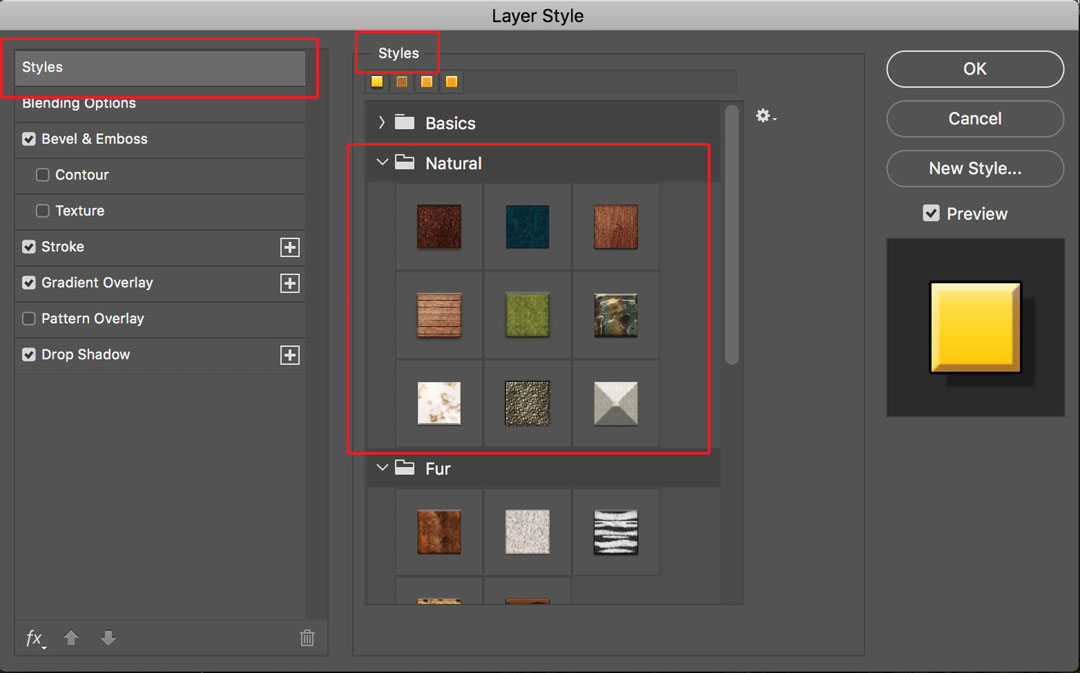
To access the Layer Style you just created, click on the “Styles” tab in the upper left. That brings up a panel that looks similar to the screen grab. The user made styles show up near the top. Select one of them and click OK. Additionally, there are several categories of default Layer Styles in the list. I have Natural styles shown in the large red box. Pick any of them and hit the OK button, and it will be applied to the layer.

To access the Layer Style you just created, click on the “Styles” tab in the upper left. That brings up a panel that looks similar to the screen grab. The user made styles show up near the top. Select one of them and click OK. Additionally, there are several categories of default Layer Styles in the list. I have Natural styles shown in the large red box. Pick any of them and hit the OK button, and it will be applied to the layer.

Subscribe
Notify of

This site uses Akismet to reduce spam. Learn how your comment data is processed.

0 Comments
Oldest
Newest Most Voted
Inline Feedbacks
View all comments